How to Create a Webhook
How to Create a Webhook in Our Application
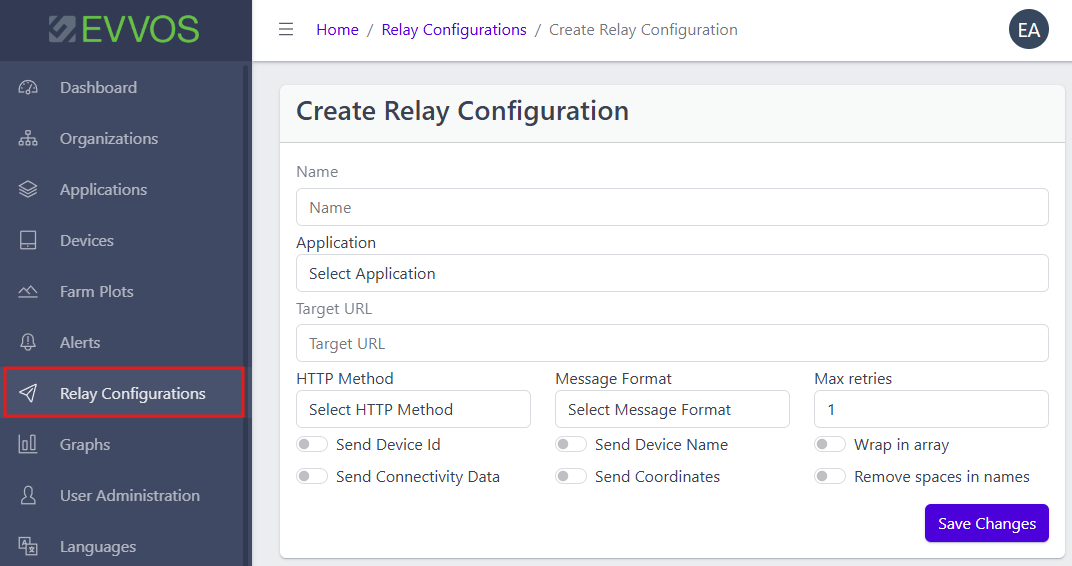
Creating a webhook a.k.a. relay in our application is a straightforward process. Follow the steps below to configure a webhook using the "Create Relay Configuration" interface.
Step-by-Step Guide
- Access the Webhook Configuration Area
- Navigate to the section of the application where you can create a webhook configuration.
- Enter the Webhook Name
- In the "Name" field, input a descriptive name for your webhook. This will help you identify the webhook easily.
- Select the Application
- Use the "Application" dropdown menu to select the appropriate application for which you are setting up the webhook.
- Set the Target URL
- Enter the "Target URL" to which the webhook will send data. Ensure it is a valid and secure URL.
- Choose the HTTP Method
- In the "HTTP Method" dropdown, select the method that matches your server's requirements - POST or PUT.
- Select the Message Format
- Use the "Message Format" dropdown to select the format such as JSON Flat, JSON Nested or FormURI Encoded that suits your integration.
- Configure Max Retries
- Specify the "Max retries" for how many times the system should attempt to send the message if the initial attempt fails.
- Optional Settings
- Wrap in Array: Enable this if the data needs to be wrapped inside an array.
- Remove Spaces in Names: Check this option if spaces should be removed from field names.
- Send Device Id: Toggle this option if the device ID should be included in the payload.
- Send Device Name: Enable if the device name should be sent.
- Send Connectivity Data: Include connectivity data like network status if necessary.
- Send Coordinates: Enable this to include GPS coordinates in the message.
- Save the Configuration
- Once all fields are filled out and settings are selected, click the "Save Changes" button to create the webhook.
Final Steps
- Testing: It's recommended to test the webhook setup to ensure that data is being sent and received as expected.
- Monitoring: Keep an eye on the webhook activity to troubleshoot any issues promptly.
By following these steps, you will successfully create a webhook in our application. If you encounter any issues, please contact support for assistance.